Session Continuity for AI Agents (what I do instead of Memory)
First published on LinkedIn, 12 October 2026.
Chatting and getting the work done using AI through a chat session was a go-to approach. Better yet, many of us may start to maintain and collect files in multiple folders, organizing them in a way that you can have AI read through the context of what was done previously. And memory management was introduced to maintain continuity between sessions.
The effort went into making sure that with a new fresh session the next morning, AI will still remember what had happened yesterday.
I want to share an alternative approach that I am currently designing, implementing and using in my daily operations. To put it plainly, its concept is to integrate a Project Management approach into the AI-native solution. The purpose is to ensure work contexts are carried over without a dedicated memory.md or some sort.
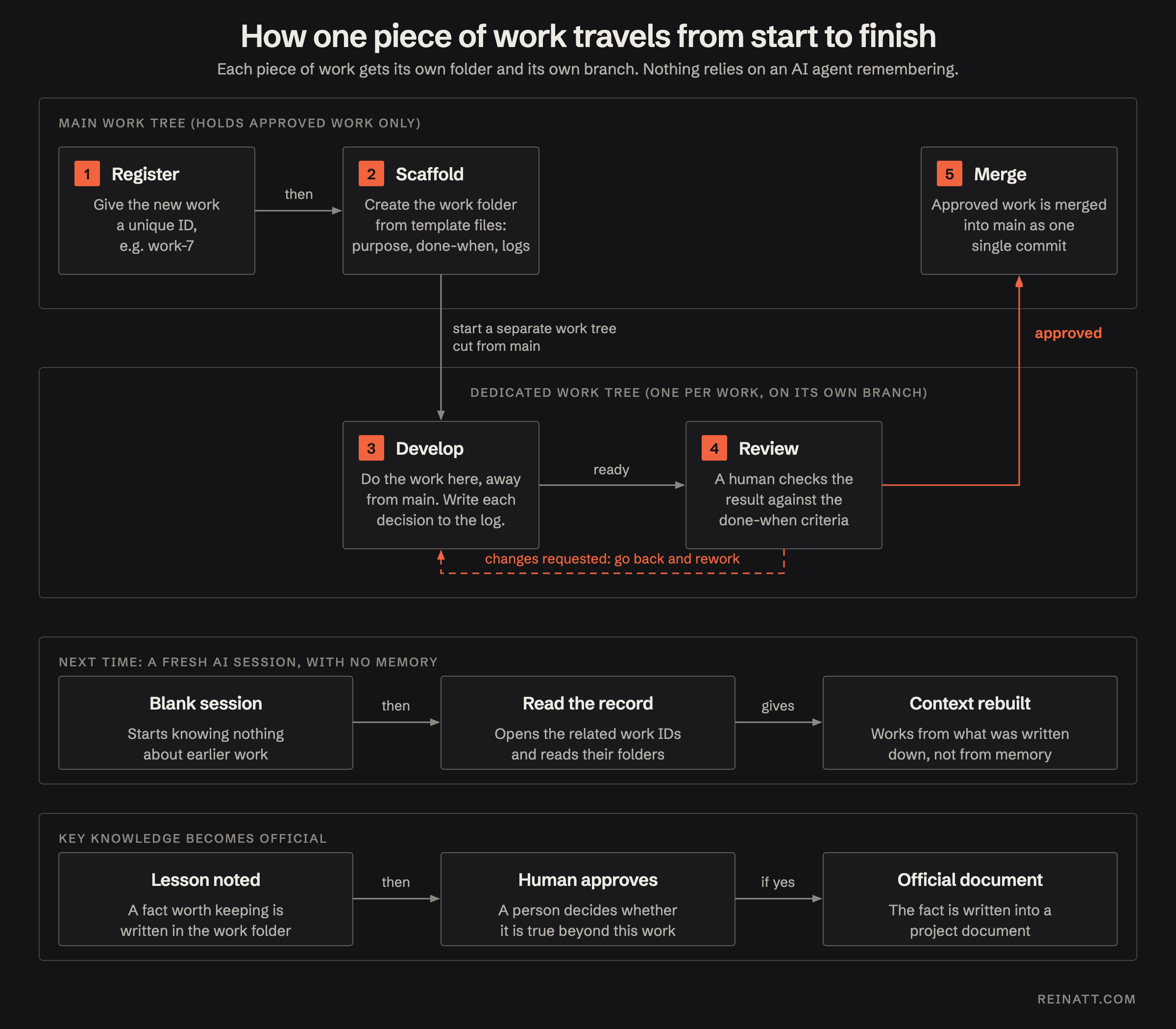
I built a “work module” that maintains tasks. Here is a brief overview of how the work is being done in the module:
Memory Management
There’s a question posed, how to maintain memory between fresh sessions of each AI agents and works. I used to design memory management workflow but later decided to not pursue further. For one (among others) reason:
To maintain memory for session continuity, there has to be a process to drain memory, clear memory, select what to remember, organize segments of memory so it is loaded in the right context, the list goes on. It requires too much of human-touch and consumed most of my hours to fine tuning it.
I separated memory management into 2 functionality: Facts and Session Continuity.
Fact is simple. If it is a fact, it is enforced to be documented. Whether it is a repeatable conduct, protocol (i.e. how AI should engage with me in chat. A guideline on how to do certain tasks. Including, technical documents such as code standard, data model, etc.).
Session Continuity is the main issue that Memory Management has been trying to solve. And the work module is what replaces Memory Management in solving it.
Work Module
A work carries its own context. Everything an AI agent needs to know in order to complete the work is inside it, so no memory is needed. The work can be broken down into smaller pieces so that multiple subagents can work separately on each task, simultaneously.
When a work is done, anything produced by this work that should be carried over for other AI agents to know, must be converted into an official document. Otherwise, it gets disposed.
There are at least 3 main processes that I then converted to skills (note that I mainly use Claude Code as my underlying tool). new-work, start-work, and approve-work.
- New-work: is to convert a discussion in a session into work requirement. It gives a new running number work ID and draft work definition (goal, objective, definition of done, requirement, context, it gives a brief on what this work is about, who initiated it, what to do to make it done, etc.). Then creates its respective work folder.
- Start-work: then move the work from main branch into a dedicated worktree. It scaffolds documents into the work folder. Ensure that the work contains the same set of files every time the work is started.
- Approve-work: is reserved for only human to approve (human-in-the-loop). Its function is to clean up the work folder, and perform post-work tasks. Documentation, eval, etc. The AI then squash-merges the work from its worktree back to the main branch * if you are not familiar with a worktree, I explained briefly at the end of article.
How the work folder should be constructed, depending on your own workflows. But at least I recommend having just these files:
logs/requirement.mdhandoff-<date>.mdreview.mduser-spec / build-spec / plan .mdconclusion.md
This should be sufficient to carry facts over to fresh AI agents to read and understand the work context from.
Wiring it together so a fresh AI agent able to form its working context
There is one skill and one document that I additionally have in order to wire work module into a fresh AI agent session.
- A skill to activate a persona
- A work protocol document
A skill to activate a persona: this is not directly related to this article so I will make it brief. This is a single skill that wires the work module and the work protocol together. it makes a fresh AI agent in the current session know what the work module is and how to use the work module.
A work protocol document: it is a document that explain how the workflow of AI with work module is. Where the work folder and file live, how to obtain new work ID, how to cut work to a worktree, work lifecycle, etc.
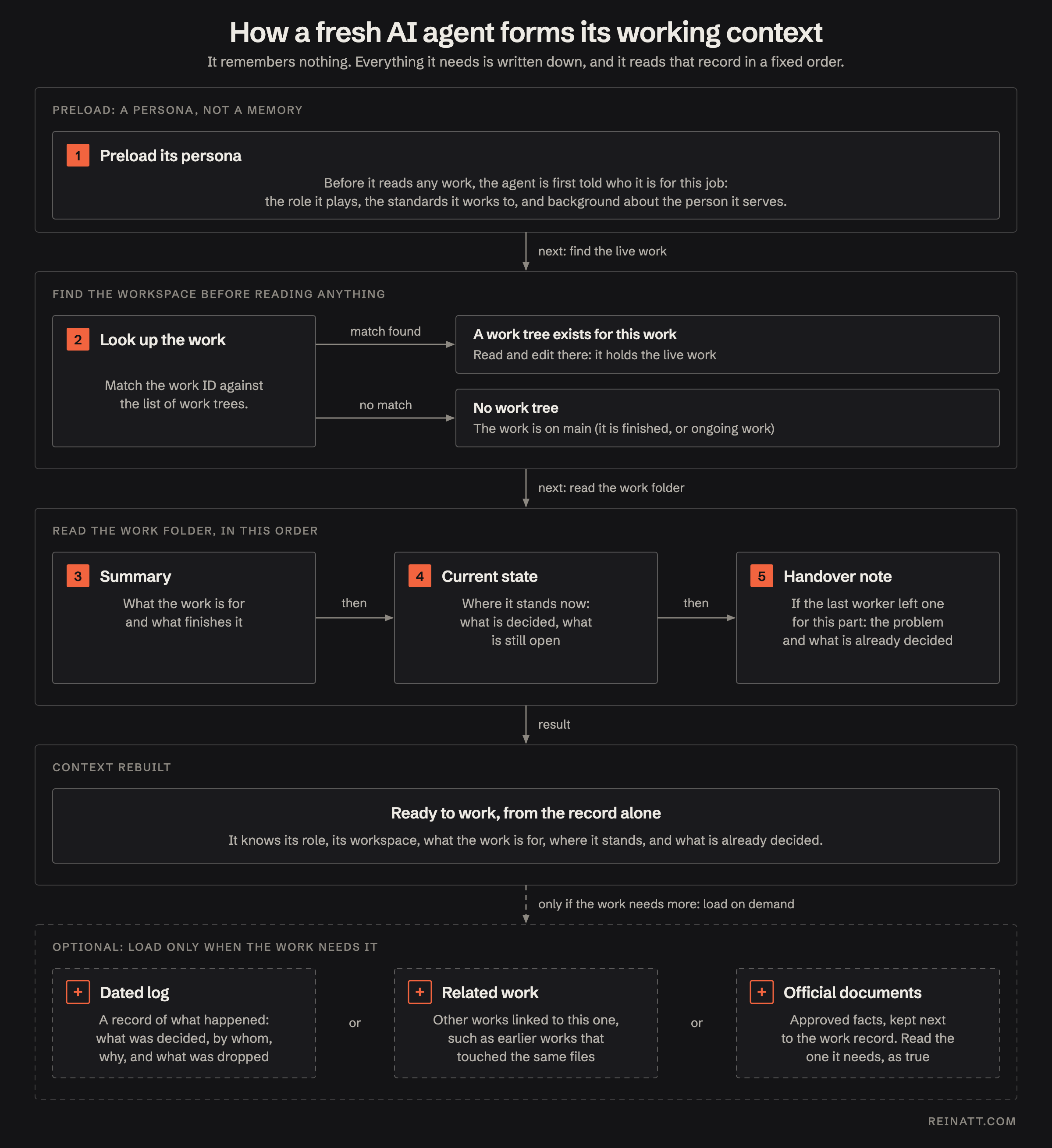
The concept is to have one document that explains the definition of “work”. I listed key topics that I am currently defining as following:
- Where work lives: to explain how AI agent can find work folder. Say, I prompt: “brief me what work-390 is about?” or “give me 5 most important works that I should get it done today”. This section explains where the work folder is.
- Id: to explain format of work Id and how to obtain one.
- Frontmatter: this section is to give definition to each of frontmatter params.
- Lifecycle: to explain the statuses a work moves through: planning, active, review, and done. These are basic statuses. Status may be up to your own workflow.
- Isolation: to explain how AI agent should use worktree and branch in order to isolate the work from the main branch.
- Log: to explain how to log. Defines what considered should be logged and what not.
- Merge and accept: to explain how the completed work can be accepted. The accepting flow and how to evaluate.
And ensure that this document is loaded every time an AI agent is active in session by enforce AI to load at skill-boot.
Take away
Disclaimer: I wrote this entire article myself, except the section below, I asked my AI agent to write that part, so it might not sound like me. It is part of an experiment.
You don’t need my module to try the idea. The idea is that the unit of continuity is the work, not the conversation. When a piece of work carries its own goal, its decisions with the reasons behind them, and a note on where it stopped, any fresh agent can pick it up cold.
You stop asking the AI to remember. You make sure everything it needs is written down.
If you want to try it this week, do three things:
- Pick one task you would normally spread across several chat sessions.
- Give it a folder with a
requirement.md(the goal and when it is done), alogs/folder (each decision, why, and what you rejected), and a handoff note you write when you stop. - Next session, open a fresh agent and point it only at that folder. Check whether it continues without you re-explaining anything.
If it does, you have replaced a memory file with a work. If it doesn’t, the gap tells you what was missing from the folder, and that is easier to fix than a memory that forgot something.
I’m still refining the wiring that makes an agent load all of this on its own. If that is the part you want to see, tell me and I’ll write it up next.
Worktree, simply put (and it may not technically accurately explained, but to keep it digestible for non-git users), to copy (clone) the entire main folder, to a new folder, and AI can work separately between original main folder, and the cloned folder. To make sure that AI won’t edit the same file at the same time.
The original is on LinkedIn.